Pagerduty's Third Interface
Brought a better PagerDuty experience into the places incident responders actually work.
UX Designer
PagerDuty
Helped ship an extremely successful release and reimagining of PagerDuty's Slack integration, decreasing friction for incident responders by creating actionable presence where they are already working

The Challenge
PagerDuty is built for speed under pressure: when something breaks, the right people need to know immediately and act fast. But incident responders weren't living in PagerDuty. They were living in Slack (and sometimes Microsoft Teams), context-switching back to PagerDuty to take action, and losing critical time and continuity in the process.
The opportunity was clear: official integrate PagerDuty's core incident response capabilities into the interfaces responders already used to communicate. A third interface — not a mobile app, not a web dashboard, but a fully functional presence inside the chat tools that had become the de facto war rooms of modern IT teams.
Brought on as a UX Designer during an active redesign of the Slack integration, I contributed to research, design, and planning across both the Slack (and later, Microsoft Teams integrations) — covering Administrator setup experiences, Responder onboarding, and end-user workflows — through to a successful September 2019 release.
The Process
Embedded into PagerDuty's globally distributed Integrations team, the project had two distinct but intertwined design challenges: making incident notifications legible and actionable inside a chat interface, and making the integration itself configurable and manageable by administrators across a wildly diverse range of organizational structures.
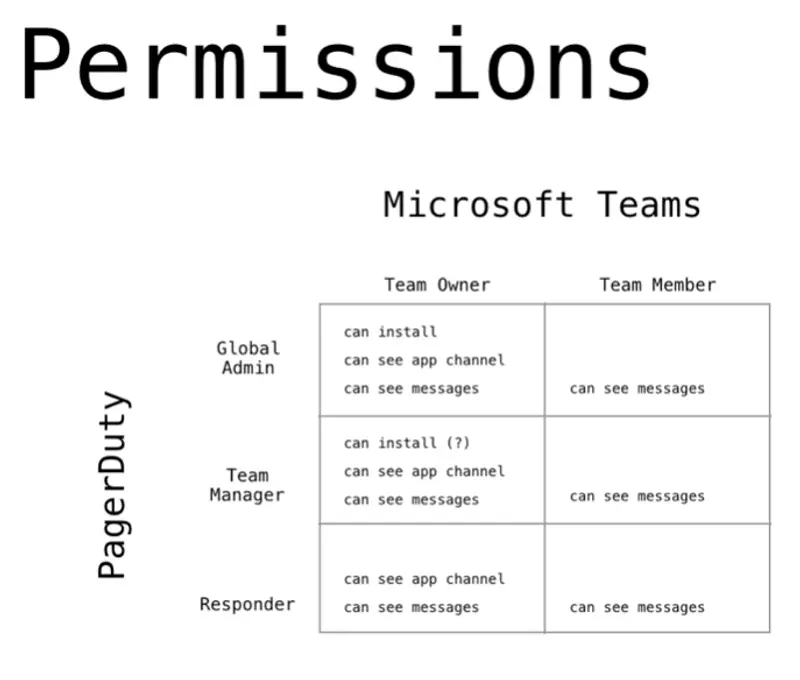
The Permissions “Matrix”
One of the biggest mountains on this project was figuring out the user model and how to map various roles and permissions to the myriad dynamic ways PagerDuty teams can be configured. PagerDuty has its own opinionated permissions structure. Slack and Microsoft Teams each have their own, and with the rollout of Slack Enterprise Grid on the horizon, we had to future proof our rollout too. Reconciling all three, across organizations ranging from four-person startups to the world's largest software companies, produced a factorial-style quantity of possible permutations.
Extensive interviews with IT leaders across that range surfaced a bitter but important truth: there was no one-size-fits-all answer. The integration needed to be highly configurable to accommodate the variety of team structures, workspace hierarchies, and security requirements in play. The key decision that unlocked the design process was centralizing configuration and administration on the PagerDuty side, keeping security and auth management in one place rather than fragmenting it across chat app workspaces. After careful consideration, we were able to whittle it down to a reasonably simple set of options that should cover the majority of cases. That decision was the watershed moment that moved us from edge-case chaos to something that we could wrap our heads around and build.
Beyond that, needing to pull users thru multi-OAuth setups and then migrate existing incident response structures onto a new platform required careful sequencing of both the auth flow design, the roles, permissions, UIs, and the messaging around it.
An unexpected but valuable side effect of working across a globally distributed team in multiple time zones was the creation of internal glossaries and diagrams to align on terminology across three different products — Slack, Microsoft Teams, and PagerDuty — where terms like "channel," "chat," and "conversation" all meant subtly different things depending on which product someone was thinking about. Slowing down to build shared language accelerated everything downstream.
The notification design problem
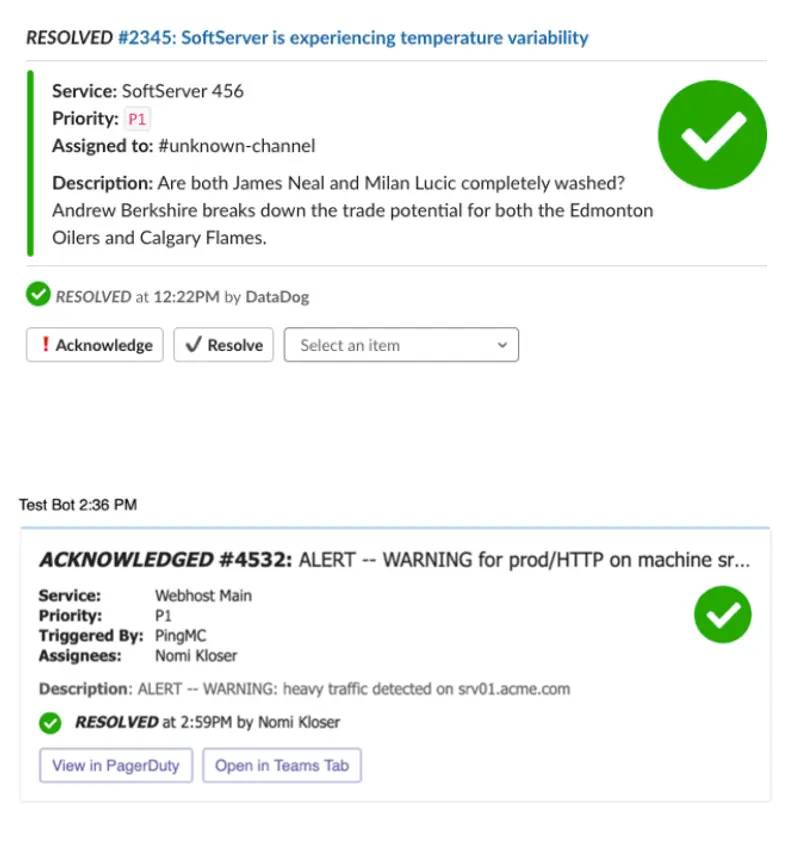
On the responder side, the core challenge was glanceability. PagerDuty notifications arriving in Slack and MS Teams were getting lost in channel noise — indistinguishable from other apps, inconsistent in their use of colour and layout, and unclear about which messages required action versus which were informational updates.
Responders described the experience as "scrolling hell." The existing implementation leaned heavily on a colour bar pattern that nearly every other app also used, rendering it meaningless in practice. And the use of coloured text for incident status — TRIGGERED, ACKNOWLEDGED, RESOLVED — failed basic WCAG 2.0 AA contrast requirements and wasn't available in Slack's Block Kit at all.
The solution required designing for a constrained canvas — Slack's Block Kit and Microsoft Teams' Adaptive Cards — with limited and varied UI elements across platforms, while maintaining visual consistency across both. Working with Slack's new thumbnail image option and Teams' more flexible card design, we introduced bold, unambiguous status icons as the primary visual anchor: big, bold, and obvious were the guiding principles.
This work surfaced a broader inconsistency in PagerDuty's product: the warning icon alone was being used to represent eight different things across the app. Auditing the full icon and status indicator landscape kicked off a longer conversation with the design team about consistency and accessibility across the product at large — a conversation that outlasted my contract.
Read the docs, spot opportunities
My technical background proved directly useful throughout, not just in execution, but in identifying opportunities for automating things like the creation of “war room channels” and pinning key incident information to the top of those - things I realized were possible because I got nerdy with the SDK docs. Comfort with JSON and API documentation let me design realistically and natively from the start — understanding what was achievable within each platform's constraints without needing to send designs back for feasibility review. I contributed code directly to PagerDuty's React component library, building out early versions of icon and button components. And knowing what developers need from design specs — having been on that side — meant annotated mockups, animated flow walkthroughs, and internal documentation were built into the process from day one, not treated as polish.
We also implemented UTM codes and Segment tracking to validate user journey hypotheses and identify new workflow patterns from real usage data — a methodology that proved valuable beyond the integrations team, surfacing insights that fed into the core product's stakeholder communications research.
[ARTIFACT: Notification Card Design — Figure 6A from PDF]
Outcomes
The Slack integration improvements shipped in September 2019 to strong reception across clients, users, and the sales team. The Microsoft Teams integration followed, informed directly by the usage pattern validation and journey hypothesis testing conducted in Slack.
The icon and status system work initiated during this project seeded ongoing conversations in PagerDuty's design team around product-wide visual consistency and accessibility — work that continued after my contract ended.
The annotated documentation approach and async-first communication practices developed for a globally distributed team became a model for cross-timezone design and development collaboration on the project.
Key Contributions
- Designed the end-to-end Responder and Administrator experiences for both Slack and Microsoft Teams integrations
- Mapped and resolved a complex three-way permissions model across PagerDuty, Slack, and MS Teams organizational structures
- Designed the notification card system for both platforms — establishing glanceability, status clarity, and cross-platform visual consistency as core principles
- Audited PagerDuty's icon and status indicator usage across the product, initiating a broader design system conversation around consistency and accessibility
- Contributed React component code to PagerDuty's design system — icon and button components built to WCAG 2.0 AA standards
- Implemented UTM and Segment tracking methodology to validate user journey hypotheses from real usage data
- Built internal glossaries, annotated mockups, and animated walkthroughs to support a globally distributed, async development team
Lessons Learned
Designing within another product's constraints is a fundamentally different problem than designing your own interface. The canvas is fixed, the UI elements are limited, and the platform evolves underneath you — sometimes taking half your design decisions with it. The discipline it requires — finding the essential thing and doing it well within tight constraints — transfers everywhere.
Having technical fluency in this project was genuinely load-bearing. Knowing what's achievable, what the API can support, and what a developer needs from a spec meant the distance between design and implementation was shorter at every stage, and I was able to provide JSON payloads for our devs that only needed a few var swaps to make real. This project was truly the type of work I love to do - still very much about making responders’ days better by creating clarity under stress, but also participating in the craft and realization of that vision.